12 February, 2021
Visualize volatility and ROI
In the short run, the market is a voting machine, but in the long run it is a weighing machine.
– Benjamin Graham, The Intelligent Investor
How does the equity volatility of Tesla (NASDAQ:TSLA) impact your return on investment on it? Let’s figure it out with Python.
Python (3.8.2), kaleido, numpy, pandas, pandas-datareader, plotly, psutil, and yfinance are required.
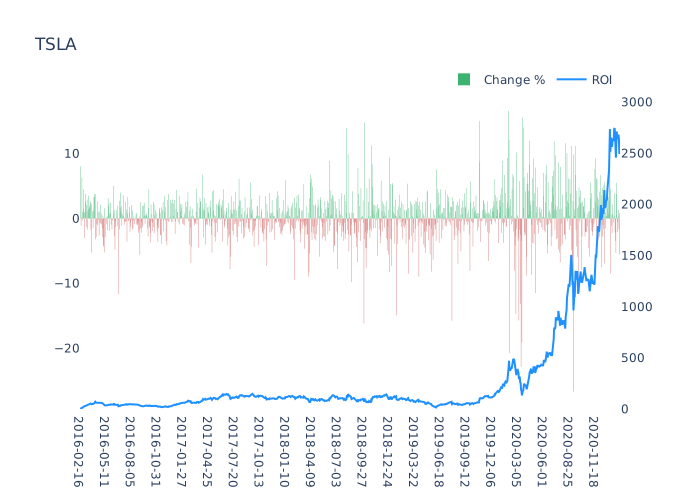
Three plots will be created with the following script:
- Static plot of price changes and ROI of all time
- Dynamic plot of price changes and ROI of all time
- Dynamic plot of price changes and ROI within one year
from datetime import datetime, timedelta, timezone
import numpy as np
import pandas as pd
import pandas_datareader as pdr
import plotly.graph_objects as go
import plotly.io as pio
import timeit
import yfinance as yf
yf.pdr_override()
class Stock:
def __init__(self):
self.s_date_format = '%Y-%m-%d'
self.dt_now_m = datetime.now(timezone.utc).replace(second=0, microsecond=0)
self.dt_start = self.dt_now_m - timedelta(days=365)
self.n_frame_duration = 0.25
def stock_change(self, ticker):
df = self.get_change(ticker)
self.stock_whole_plot(df, ticker)
self.stock_whole_frame_plot(df, ticker)
self.stock_frame_plot(df, ticker)
def get_change(self, ticker):
'''
get the data of a ticker from `pandas_datareader` with `yfinance`, includes `High`, `Low`, `Open`, `Close`, `Volume`, `Adj Close`
'''
df = pdr.get_data_yahoo(ticker)
df.loc[:, 'change'] = np.diff(df['Adj Close']) / df['Adj Close'].iloc[1:] * 100
return df
def stock_plot_data(self, df):
'''
calculate the data required for plots
'''
df.loc[:, 'date'] = df.index.strftime(self.s_date_format)
df.loc[:, 'roi'] = (df['Adj Close'] - df['Adj Close'].iloc[0]) / df['Adj Close'].iloc[0] * 100
# set bar colors
df.loc[:, 'color'] = 'mediumseagreen'
df.loc[df.change < 0, 'color'] = 'indianred'
# use `.item()` to get the value from a series
change_min = min(df[['change']].min().item() * 0.9, df[['change']].min().item() * 1.1)
change_max = max(df[['change']].max().item() * 0.9, df[['change']].max().item() * 1.1)
roi_min = min(df.roi.min().item() * 0.9, df.roi.min().item() * 1.1)
roi_max = max(df.roi.max().item() * 0.9, df.roi.max().item() * 1.1)
return df.loc[:, 'date'], df.loc[:, 'roi'], df.loc[:, 'color'], change_min, change_max, roi_min, roi_max,
def stock_whole_plot(self, df, ticker):
'''
plot the data of all time
'''
df.loc[:, 'date'], df.loc[:, 'roi'], df.loc[:, 'color'], trace1_min, trace1_max, trace2_min, trace2_max = self.stock_plot_data(df)
layout = go.Layout(
xaxis=dict(
# use `type='category'` to eliminate weekend gaps
type='category',
tickvals=df.date[::60]),
yaxis=dict(range=[trace1_min, trace1_max]),
yaxis2=dict(range=[trace2_min, trace2_max], anchor='x', overlaying='y', side='right'),
title=ticker,
plot_bgcolor='rgba(0,0,0,0)')
trace1 = go.Bar(x=df.date, y=df.change, marker=dict(color=df.color, line=dict(width=0)), type='bar', name='Change %')
trace2 = go.Scatter(x=df.date, y=df.roi, yaxis='y2', marker_color='dodgerblue', name='ROI')
fig = go.Figure(data=[trace1, trace2], layout=layout)
# display hairline
fig.update_layout(hovermode='x unified')
fig.update_layout(legend=dict(orientation='h', yanchor='bottom', y=1.02, xanchor='right', x=1))
filename = f'{ticker}_{df.date[0]}_{df.date[-1]}'
pio.write_html(fig, file=f'{filename}.html', auto_open=True, auto_play=False)
fig.write_image(f'{filename}.svg')
def stock_whole_frame_plot(self, df, ticker):
'''
plot the data of all time with dynamics
'''
def frame_args(duration):
return {
'frame': {'duration': duration * 1000},
'mode': 'immediate',
'fromcurrent': True,
'transition': {'duration': duration * 1000},
}
n_frame_accelerate = 10
df.loc[:, 'date'], df.loc[:, 'roi'], df.loc[:, 'color'], trace1_min, trace1_max, trace2_min, trace2_max = self.stock_plot_data(df)
figFrame = []
layout = go.Layout(
xaxis=dict(
type='category',
tickvals=df.date[::20]),
yaxis=dict(range=[trace1_min, trace1_max]),
yaxis2=dict(range=[trace2_min, trace2_max], anchor='x', overlaying='y', side='right'),
title=ticker,
plot_bgcolor='rgba(0,0,0,0)',
updatemenus=[dict(type='buttons', buttons=[
dict(label='1x', method='animate', args=[None, frame_args(self.n_frame_duration / n_frame_accelerate)]),
dict(label='20x', method='animate', args=[None, frame_args(self.n_frame_duration / n_frame_accelerate / 20)]),
dict(label='Pause', method='animate', args=[[None], frame_args(0)]), ])])
for i, r in df.iterrows():
trace1 = go.Bar(x=df.date[:i], y=df.change[:i], marker=dict(color=df.color[:i], line=dict(width=0)), type='bar', name='Change %')
trace2 = go.Scatter(x=df.date[:i], y=df.roi[:i], yaxis='y2', marker_color='dodgerblue', name='ROI')
figFrame.append(go.Frame(data=[trace1, trace2]))
fig = go.Figure(data=figFrame[0].data, layout=layout, frames=figFrame)
fig.update_layout(hovermode='x unified')
pio.write_html(fig, file=f'{ticker}_dynamic_{df.date[0]}_{df.date[-1]}.html', auto_open=True, auto_play=False)
def stock_frame_plot(self, df_whole, ticker):
'''
plot the data within one year with dynamics
'''
def frame_args(duration):
return {
'frame': {'duration': duration * 1000},
'mode': 'immediate',
'fromcurrent': True,
'transition': {'duration': 1},
}
df = df_whole[df_whole.index.to_pydatetime() >= self.dt_start.replace(tzinfo=None)].copy()
df.loc[:, 'date'], df.loc[:, 'roi'], df.loc[:, 'color'], trace1_min, trace1_max, trace2_min, trace2_max = self.stock_plot_data(df)
n_figView = 121
figFrame = []
# create an array with a dimension of zeros and two dimensions of NaN
a_df = np.concatenate((np.zeros((n_figView, 1)), np.full((n_figView, 2), np.nan)), axis=1)
# add a date as the last element to each dimension in an array with `numpy.concatenate`
a_df = np.concatenate((a_df, np.array(pd.bdate_range(end=df.date.iloc[0], periods=n_figView).strftime(self.s_date_format))[:, None]), axis=1)
layout = go.Layout(
xaxis=dict(
type='category',
tickvals=np.append(a_df[:, -1], df.date.values)[::20]),
yaxis=dict(range=[trace1_min, trace1_max]),
yaxis2=dict(range=[trace2_min, trace2_max], anchor='x', overlaying='y', side='right'),
title=ticker,
plot_bgcolor='rgba(0,0,0,0)',
updatemenus=[dict(type='buttons', buttons=[
dict(label='1x', method='animate', args=[None, frame_args(self.n_frame_duration)]),
dict(label='10x', method='animate', args=[None, frame_args(self.n_frame_duration / 10)]),
dict(label='Pause', method='animate', args=[[None], frame_args(0)]), ])])
for i, r in df.iterrows():
a_df = np.vstack((a_df[1:, :], r[['change', 'roi', 'color', 'date']]))
trace1 = go.Bar(x=a_df[:, -1], y=a_df[:, 0], marker=dict(color=a_df[:, -2], line=dict(width=0)), type='bar', name='Change %')
trace2 = go.Scatter(x=a_df[:, -1], y=a_df[:, 1], yaxis='y2', marker_color='dodgerblue', name='ROI')
figFrame.append(go.Frame(data=[trace1, trace2]))
fig = go.Figure(data=figFrame[0].data, layout=layout, frames=figFrame)
fig.update_layout(hovermode='x unified')
pio.write_html(fig, file=f'{ticker}_dynamic_{df.date[0]}_{df.date[-1]}.html', auto_open=True, auto_play=False)
if __name__ == '__main__':
timer_start = timeit.default_timer()
yfin = Stock()
yfin.stock_change('TSLA')
timer_end = timeit.default_timer()
print(f'Execution time: {timer_end - timer_start} seconds')
Here is a sample of the generated dynamic graph: